HappyCardFactory Designs

Dream. Create. Inspire.

  • Shop
  • Facebook
  • Pinterest
  • Twitter
  • Instagram
  • Home
  • Our Store
  • Blog
  • Tutorials
  • 3D Projects
    • 3D Crafts
    • 3D Flowers
    • 3D Letters
  • Contact
  • About Me
    • About Me
    • Disclosure
    • Privacy Policy
  • Join Our Group
You are here: Home / crafts / Emboss With Your Electronic Die Cutter!

Emboss With Your Electronic Die Cutter!

December 6, 2013 by Rebecca Wagner 8 Comments

zigchri086
The cost of metal dies are very cost prohibitive to me. Every time I go to the store and see a design that embosses and cuts at the same time, I am drawn to purchase it. Then I fight with myself because I have way, way too many cut files, and reason that I really don’t need the embossing feature. Don’t get me wrong, I love the look, but can always talk myself out of it. Well, I found a way to use what I already own and get pretty darn good results. In this tutorial, I will show you how to emboss with your electronic die cutter!
 
While using your electronic die cutter with an embossing mat and tool will not give you the deep impression you can get from a folder or a dual duty metal die, it’s still worth playing around with. This technique is especially cool on those designs that have a bonus layer like the one I use here. Let me show you what kind of results you can get.
 
Supplies:
  • embossing mat 
  • embossing tool (Chomas adjustable pen holder with stylus)
  • Seasoned Christmas Cut It (mittens) by Lettering Delights
  • cardstock
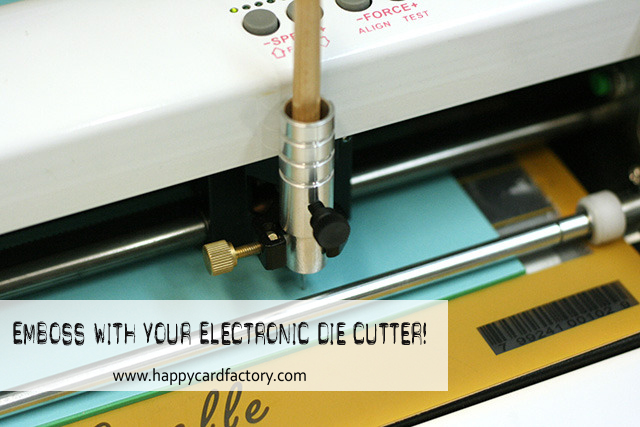
Since there are such a variety of machines with different designs on the market, I can’t possibly go over how you would do this with your particular machine. What I can do is explain what I did with mine and hope that sparks an idea that will work with yours. My machine of choice for this project was the Gazelle. Boss Kut and most machine manufacturers have an OEM embossing tool available. I do not have one for my Gazelle so I improvised. If you have one, you can move on to the next step. If not, all is not lost. Do you have a stylus laying around? Grab one and plop it into your machine. I have a set of them in different end sizes for flower making. It works out better because I am not stuck with a single line width. I have ten to choose from. I love options!
 
As you can see by the picture the blade mechanism has a screw that holds the blade holder. What’s great is that it can hold almost any pen or marker without the additional cost of a separate holder. The bad thing is that you have to play with offset if you want the pen centered. I’m lazy and didn’t want to mess with possibly having my embossing too close to my cut line so I used my pen holder. You may have a swing arm and need a pen holder. There are a few third-party ones available that fit a great number of machines. Use whatever works for you to achieve an emboss. A word of warning, check with your machine’s manufacturer to make sure you are not voiding your warranty by using a third-party product.
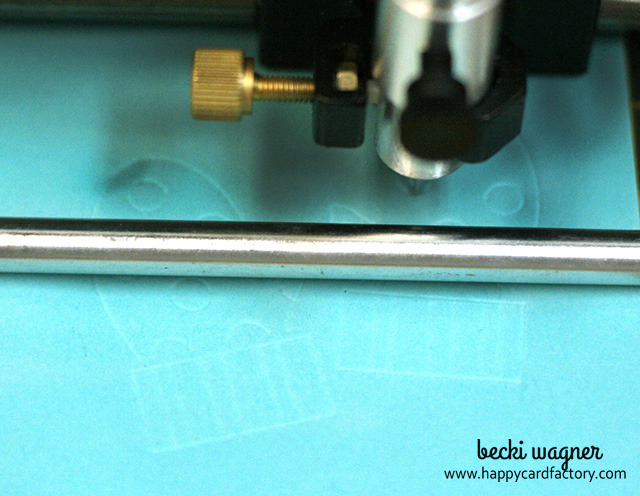
 
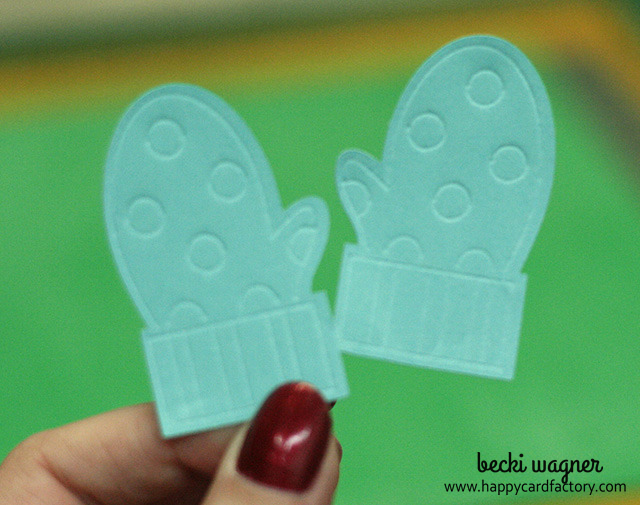
zigchri091The mitten cut file is a simple silhouette shape with a decorative bonus layer. I hid the outline layer and “cut” the bonus layer using the stylus in place of my blade. I started on a lower force and bumped it up till I saw a nice impression. You need to start with a lower force otherwise if it is too high it will tear into your paper and mat. Ask me how I know.  :/
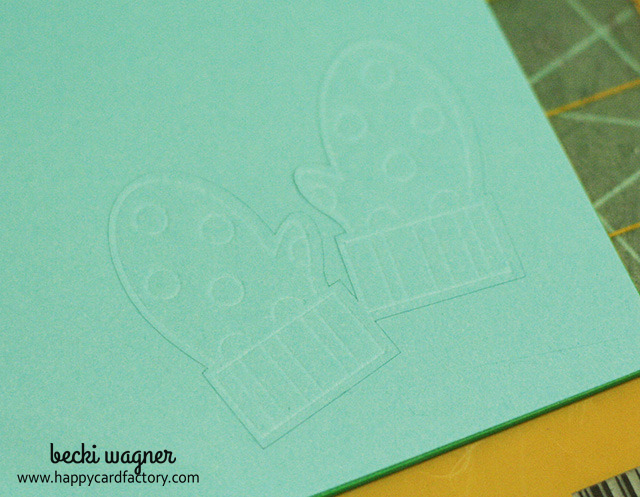
 
zigchri097Don’t be afraid to go over the embossing layer again with a multi-cut at the same force till you get your desired look. Once the embossing is to your liking, replace the tool with your blade and cut out the silhouette layer. Note, if you have your blade set correctly, it will just barely scratch the foam like it would on your regular mat.
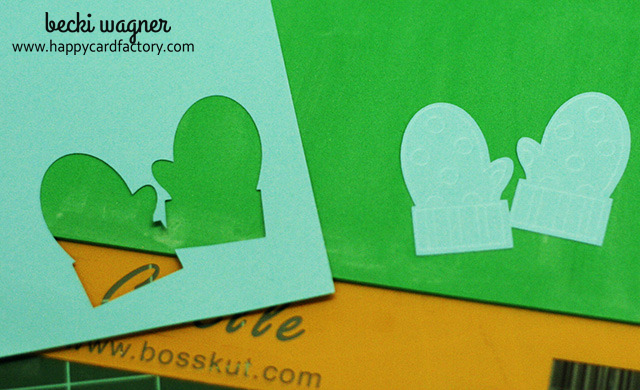
 
zigchri098Nice clean cut and embossing. Did we really just use our machine to make miracles happen? Why yes, yes we did! 
 
zigchri104
You may not feel the same, but I was pretty excited I figured this out. I mean, I don’t like to spend the money on a technique I may only used once or twice in my craft life. This way I can still do a fancy trick or two with very little cost to me.
 
Now put your new technique to work on a fabulous element for your next project. Ah, makes a crafter proud when she can add another technique to her arsenal, doesn’t it? Particularly, if we saved money and looked good doing it!



Filed Under: crafts, Pen Feature, tutorial

« DIY Embossing Mat for Your Electronic Die Cutter
Ribbon Handle Boxes »

Comments

  1. Joanna says

    December 20, 2013 at 4:03 pm

    Great tutorial Becki and love the money saving embossed technique.

    Reply
    • Becki says

      December 20, 2013 at 5:31 pm

      Thanks, Joanna!

      Reply
  2. Amy Chomas says

    December 22, 2013 at 4:21 pm

    Looks great! Thanks so much for sharing!

    Reply
    • Becki says

      January 1, 2014 at 7:19 pm

      Thanks, Amy!

      Reply
  3. Mary Roberson says

    December 27, 2013 at 11:45 am

    Awesome! Now, why didn’t I think of that? Thanks for sharing this technique with us.

    Reply
    • Becki says

      December 27, 2013 at 11:51 am

      You’re welcome, Mary!

      Reply
  4. ClaraLuna says

    January 3, 2014 at 3:44 am

    Thanks for sharing this tips with us ! Do you stick your paper on your embossing map ?

    Reply
    • Becki says

      January 3, 2014 at 12:54 pm

      Yes, you would stick your paper to the foam of your embossing mat. šŸ™‚

      Reply

Leave a Reply Cancel reply

Your email address will not be published. Required fields are marked *

This site uses Akismet to reduce spam. Learn how your comment data is processed.

About the Designer

Hi, I'm Rebecca. I am a child of God. A loving wife of 29 years. A boy mom. A collector of gadgets, gizmos, and superhero action figures. Making the world more organized one planner at a time. Read More…

  • Facebook
  • Instagram
  • Pinterest
  • Twitter

Looking for Something?

Categories

Copyright

You are welcome to feature or share any article, as long as you use only one image and link back to the specific post. You may NOT edit, crop, remove my watermark, or change my images in any way without written permission.

Republishing posts in their entirety is prohibited. If I somehow produce something that inspires you to create your own, please credit me and link back to my site. Thanks!
  • Blog
  • Home
  • Tutorials
  • About Me
  • Contact Me
  • 3D Projects
  • CGP VIP Group

Join us on Instagram

We’ve got some good ones! #citygirlplanners #pl We’ve got some good ones!

#citygirlplanners #plannercommunity #plannerrefills #plannerstuff
Just waiting on that UAP info to drop. šŸ¤”šŸ˜ # Just waiting on that UAP info to drop. šŸ¤”šŸ˜

#unicornsfromuranus #citygirlplanners #plannerlife #stationerylove
So, I did a thing. Working on a pain point for Per So, I did a thing. Working on a pain point for Personal size. This is for those of you who think it’s too narrow but don’t want to purchase a new PW binder. Franklin Covey Compact is the next best thing. 

If you have a FFC binder already, we now will have refills for you too! 

#franklincoveycompact #citygirlplanners #personalringplanner #lvmmagenda
Foil lovers... we heard you. Since our foil equi Foil lovers... we heard you. 

Since our foil equipment went down, the messages and emails have not stopped. We know how much you love the look and honestly we love it too.

Replacing commercial foil equipment runs into the tens of thousands of dollars and, like a lot of small businesses right now, that's just not realistic. 

After months of testing with our existing setup, we think we found a way to bring foil back.

It's not mass factory perfect. Occasionally there may be a tiny spot where the foil doesn't pull 100%. Nothing obvious, nothing we wouldn't personally use, and nothing that doesn't meet our standards will ship.

But overall? We think it looks pretty gorgeous.

Before we officially bring foil back…

Would you still want it knowing it's handcrafted and not machine perfect? 

Tell me honestly in the comments. Your feedback will decide this one. 

#foilinserts #foilingtechnique #citygirlplannersinserts #citygirlplanners
Now on to the cutting phase. #citygirlplanners # Now on to the cutting phase. 

#citygirlplanners #stationerylove #plannercommunity #behindthescenes
New notepads in the making. Any guesses? #citygir New notepads in the making. Any guesses?

#citygirlplanners #plannercommunity #plannerlove #citygirlplannersinserts
Nothing ruins a perfectly good month like… bills Nothing ruins a perfectly good month like… bills.

Good news: when everything’s written down, at least the chaos is organized.

Pay it. Check it off. Pretend you’re thriving.

#CityGirlPlanners #AdultingButMakeItCute #BillTracker #PlannerLife #OrganizedChaos
Personal Size planners get a bad rap for one reaso Personal Size planners get a bad rap for one reason…

They’re narrow.

And I get it.
Personal is the perfect middle ground. Bigger than Pocket, fits in your purse, but way more portable than A5.

But the width?
That’s always been the complaint.

Lately I’ve been seeing people try to squeeze Personal Wide into standard Personal binders… and then wonder why the pages stick out.

So instead of making it wider… I went the other direction.

Foldouts.

For 2026, I reworked the layout to give you more planning space without changing the footprint.

Month on one page
Straight into your weekly
Dashboard space (because you know I had to keep that)
And when it’s folded?
Standard Personal Size. Fits your binder like it should.

Now I need your opinion before I finalize this…

What works better in vertical boxes?

Graph (left side)
or
Lines (right side)

Tell me in the comments — Graph or Lines?
Who else misses Micro planners? I found this under Who else misses Micro planners? I found this under a stack of papers. Don’t know how long it’s been chillin under there but I’m going to start using it. Great for quick notes and things you need to dump but don’t need long term.
Follow Us!

Categories

Archives

Copyright © 2026 · HappyCardFactory Designs